
What a Sectional Chart Is
A sectional aeronautical chart is the standard VFR map for visual flight in the United States. It is drawn at a scale of 1:500,000 — roughly 6.86 nautical miles per inch — which is detailed enough to show individual airports, towers, and roads while still covering a wide region on one chart.
Sectionals are republished on a 56-day cycle (about every eight weeks), so airspace, frequencies, and obstructions stay current. Always check the effective date printed in the margin and fly the current edition. The chart packs an enormous amount of information into color, line style, and small symbols — once you know the legend, you can read it at a glance. If you would rather pan around a live one while you read, open FlightKit’s charts in a second tab.
Airport Symbols
The color of an airport symbol tells you about its control tower; the shape and the marks around it tell you about services, runways, and access.
Magenta = no tower
A magenta airport symbol marks a field with no operating control tower — an uncontrolled field where traffic self-coordinates on a CTAF.
Blue = towered
A blue airport symbol marks a field with an operating control tower. You will work the tower frequency for takeoff and landing.

Paved, non-towered
Hard-surfaced runway 1,500–8,069 ft. Magenta = no operating tower.

Soft field
Turf, gravel, or other unpaved surface. Still non-towered.

Towered
Blue = operating control tower. The four ticks mean fuel is available.

Private (R)
Restricted use — prior permission required before you land.

Closed
Abandoned or closed to all traffic. Useful as a landmark, not a destination.

Military
A military field. Civilian use is normally by prior arrangement only.

Seaplane base
Water landing area — the anchor is the giveaway.

Heliport
Rotary-wing facility.
Small fields appear as a plain circle; larger fields show the actual runway layout drawn to scale, so you can see runway orientation before you even open the chart supplement. Tick marks around the circle indicate that fuel is available and the field meets basic-services criteria. Hard-surfaced runways are drawn solid; soft or turf fields show the open circle or an open runway outline.
The Airport Data Block
Every airport carries a small block of text next to its symbol. Read it left to right, top to bottom:
What each line carries
Line 1
Airport name
Frequencies & lighting
CT- tower frequency, a star for part-time lighting, and L for lighting
Elevation & runway
Field elevation (ft MSL), then the longest runway length in hundreds of feet
CTAF & weather
CTAF marked with a circle-A symbol; AWOS/ASOS automated weather frequency nearby
Example read: an elevation of 1,200 with L 72 means the field sits at 1,200 ft MSL, is lighted, and has a longest runway of 7,200 ft. Every field’s block is spelled out in full on its airport page, runways and frequencies included.
Airspace Depiction
Airspace is drawn entirely in line color and style. The faded (vignetted) side of a band always points to the lower floor. Those flat lines are a top-down slice of a three-dimensional structure — the profile below is what you are actually flying through, and airspace classes explained covers the entry rules for each one.
Concentric rings around the busiest airports; floors/ceilings shown as a fraction (e.g. 100 over the surface).
Two rings around busy towered fields; floor and ceiling in hundreds of feet MSL.
Surrounds a towered field; a boxed number in dashed blue shows the ceiling in hundreds of feet MSL.
Controlled airspace down to the ground, usually around an airport with instrument approaches.
Inside the faded magenta, Class E starts at 700 ft AGL.
Outside the blue, Class E starts at 1,200 ft AGL; the faded side is the lower floor.
Reading floors and ceilings
Class B and C show stacked numbers next to each ring: the top number is the ceiling and the bottom number is the floor, both in hundreds of feet MSL. “SFC” in the bottom slot means the airspace extends down to the surface. A Class D ceiling appears as a dashed-blue boxed number, also in hundreds of feet MSL.
The Maximum Elevation Figure (MEF) is the large number centered in each latitude/longitude quadrangle — the highest known terrain or obstruction in that box, MSL, rounded up with a buffer. Use it for terrain awareness, not as a legal minimum altitude.
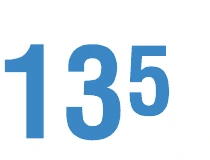
MEF — 13,500 ft MSL
Read the big digits as thousands and the small digit as hundreds.
Topography & Terrain
Terrain is shown three ways at once. Contour lines connect points of equal elevation; closely spaced lines mean steep terrain. Color tints shade higher ground in progressively darker bands per the elevation key in the margin. Spot elevations mark individual peaks with a dot and a number in feet MSL.
The single highest elevation on the entire chart is called out in the margin and flagged on the map with a bold spot elevation — worth noting before any cross-country into mountainous terrain — high terrain also means density altitude will be working against your climb rate.
Obstructions
Towers and other tall structures are drawn with an obstruction symbol and two heights.
Two heights
The bold number is the height of the top above mean sea level (MSL). The smaller number in parentheses is the height above ground level (AGL).
Lighted vs. tall
A lightning-bolt-style flash around the symbol means the obstruction is lighted. A heavier symbol marks obstructions 1,000 ft AGL and higher. Closely grouped towers share a group-obstruction symbol.
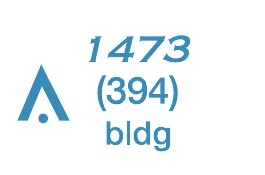
Under 1,000 ft AGL
Bold number = top in ft MSL; the number in parentheses = height AGL.
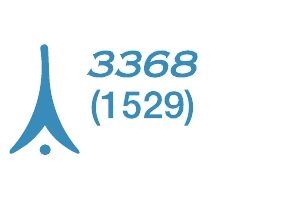
1,000 ft AGL and higher
The heavier flared symbol flags the tall ones.
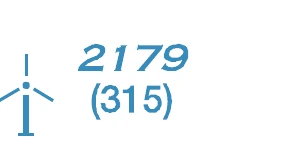
Wind turbine
Single turbine; wind farms get a grouped symbol.
Navaids
Ground-based navaids each have a distinct symbol: a plain hexagon for a VOR, a hexagon with a filled square inset for a VOR-DME, and a hexagon with three solid tabs for a VORTAC.
A compass rose ringed around the navaid is oriented to magnetic north so you can read radials directly off the chart. The adjacent frequency box lists the navaid name, identifier, Morse code, and frequency.

VOR
Plain hexagon — bearing information only.

VOR-DME
Hexagon inside a square — adds distance measuring.

VORTAC
Three solid tabs — VOR plus the military TACAN component.

NDB
Magenta dotted ring — a non-directional beacon, tracked with an ADF.
Special-Use Airspace & Other Markings
Special-use airspace — prohibited (P), restricted (R), warning (W), military operations areas (MOAs), and alert areas — is outlined with distinctive blue or magenta hatched borders. Their names, altitudes, and hours of operation are tabulated in the chart margin — see airspace classes for what each one means in the air.
Military Training Routes (MTRs) appear as thin gray lines labeled IR or VR followed by a route number, marking where high-speed military traffic operates.
Watch also for national security and special-flight-rules areas, parachute-jump symbols, and glider and ultralight activity flags, all keyed in the legend.

VFR checkpoint
A magenta flag over a landmark ATC will ask you to report.

VFR waypoint
A named GPS-only fix — five letters starting with "VP".
How to Use the Legend
When in doubt, the legend wins
Every printed sectional carries a legend panel that defines each symbol, line, and color. No pilot memorizes all of them — the skill is knowing the common ones cold and looking up the rest. The FAA Aeronautical Chart Users Guide is the full reference if you want every symbol explained. On FlightKit, the same symbology renders on an interactive chart, so you can tap an airport or airspace to confirm what you are reading — and every airport page spells out the same data block in plain language.
See it on a live chart
FlightKit’s interactive sectional charts overlay airports, airspace, and hazards in view — tap any symbol to confirm what the legend is telling you, then plan your route right on the map.
Keep learning
Frequently Asked Questions
What does a magenta vs. blue airport symbol mean?
Color tells you about the tower, not the runway. A magenta airport symbol means the field has no operating control tower — it is uncontrolled, with traffic coordinated on a CTAF. A blue airport symbol means the field has an operating control tower. The shape (circle vs. drawn runways), tick marks, and the R in a box tell you about services, runway layout, and private status separately.
What is the MEF on a sectional chart?
MEF stands for Maximum Elevation Figure. Each quadrangle bounded by ticked lines of latitude and longitude shows a large number, often in two parts (e.g. a big 8 and a small 5 for 8,500 ft). It represents the highest known terrain or obstruction within that quadrangle, MSL, rounded up with a buffer. The MEF is a terrain-clearance reference, not a legal minimum altitude.
What scale is a sectional chart?
A sectional chart is drawn at a scale of 1:500,000. That works out to roughly 6.86 nautical miles (about 8 statute miles) per inch on the chart. The larger-scale Terminal Area Charts cover busy Class B areas at 1:250,000 for more detail.
How do you read the airport data on a sectional?
Next to each airport symbol is a data block. It typically lists the airport name, then a line that may include the control tower frequency (preceded by CT-), a star for part-time lighting, an L for lighting, the field elevation in feet MSL, the length of the longest runway in hundreds of feet, and the CTAF or UNICOM frequency (the CTAF is marked with a circle-A symbol). AWOS/ASOS automated weather frequencies appear nearby when available.
How often are sectional charts updated?
Sectional charts are published on a 56-day cycle, so a new edition comes out roughly every eight weeks. Always check the effective date in the chart margin and fly with the current edition, because airspace, frequencies, and obstructions change between cycles.
What do the blue and magenta airspace lines mean?
Solid blue is Class B, solid magenta is Class C, and a dashed blue line is Class D. A dashed magenta line is Class E down to the surface. The fuzzy magenta band (magenta vignette) marks where Class E begins at 700 ft AGL, and the fuzzy blue band marks the 1,200 ft AGL Class E floor. The faded side of each vignette is always the side with the lower floor.